Calendar 2.0:
The Calendar Re-imagined
Staffpoint isn’t just a calendar—it’s your smart staffing sidekick. Instantly find qualified, available team members with AI-powered suggestions. No guesswork, just seamless scheduling.
Scheduling software that's more than a digital calendar.
A more demanding working world calls for a better way to manage team schedules.
The 1-Click Search Engine
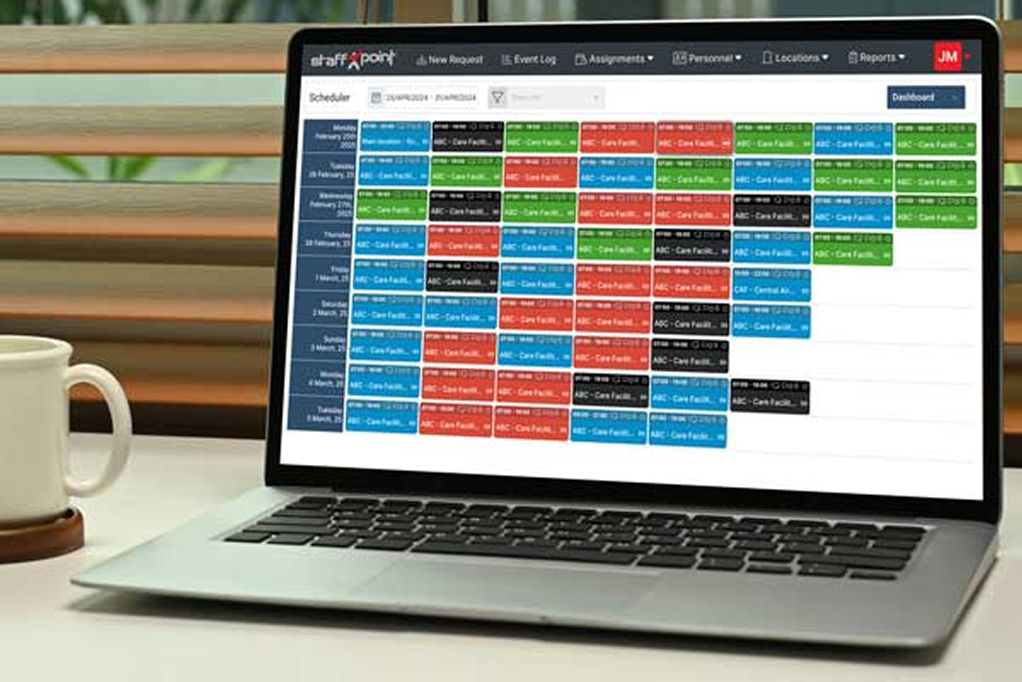
Staffpoint’s color-coded interface and one-click staff suggestions make it easy for anyone to create the schedule the way you would.
- Color codes tell you that red tabs are open shifts, blue tabs are booked shifts, and green tabs are completed shifts.
- Custom rules for distance, time between shifts, and overtime thresholds tell Staffpoint who to suggest.
- Filters help you see shifts that are waiting to be filled, upcoming and booked, awaiting check in, and more.
The 1-Click Search Engine
Staffpoint’s color-coded interface and one-click staff suggestions make it easy for anyone to create the schedule the way you would.
- Color codes tell you that red tabs are open shifts, blue tabs are booked shifts, and green tabs are completed shifts.
- Custom rules for distance, time between shifts, and overtime thresholds tell Staffpoint who to suggest.
- Filters help you see shifts that are waiting to be filled, upcoming and booked, awaiting check in, and more.
Situational Personnel Ranking
Staffpoint’s color-coded interface and one-click staff suggestions make it easy for anyone to create the schedule the way you would.
- Color codes tell you that red tabs are open shifts, blue tabs are booked shifts, and green tabs are completed shifts.
- Custom rules for distance, time between shifts, and overtime thresholds tell Staffpoint who to suggest.
- Filters help you see shifts that are waiting to be filled, upcoming and booked, awaiting check in, and more.
Advanced Calendar filtering
Staffpoint’s color-coded interface and one-click staff suggestions make it easy for anyone to create the schedule the way you would.
- Color codes tell you that red tabs are open shifts, blue tabs are booked shifts, and green tabs are completed shifts.
- Custom rules for distance, time between shifts, and overtime thresholds tell Staffpoint who to suggest.
- Filters help you see shifts that are waiting to be filled, upcoming and booked, awaiting check in, and more.
Copy and paste assignments
Staffpoint’s color-coded interface and one-click staff suggestions make it easy for anyone to create the schedule the way you would.
- Color codes tell you that red tabs are open shifts, blue tabs are booked shifts, and green tabs are completed shifts.
- Custom rules for distance, time between shifts, and overtime thresholds tell Staffpoint who to suggest.
- Filters help you see shifts that are waiting to be filled, upcoming and booked, awaiting check in, and more.
Effortless Recurring Scheduling
Staffpoint’s color-coded interface and one-click staff suggestions make it easy for anyone to create the schedule the way you would.
- Color codes tell you that red tabs are open shifts, blue tabs are booked shifts, and green tabs are completed shifts.
- Custom rules for distance, time between shifts, and overtime thresholds tell Staffpoint who to suggest.
- Filters help you see shifts that are waiting to be filled, upcoming and booked, awaiting check in, and more.
Dashboard, Calendar and List Views
Staffpoint’s color-coded interface and one-click staff suggestions make it easy for anyone to create the schedule the way you would.
- Color codes tell you that red tabs are open shifts, blue tabs are booked shifts, and green tabs are completed shifts.
- Custom rules for distance, time between shifts, and overtime thresholds tell Staffpoint who to suggest.
- Filters help you see shifts that are waiting to be filled, upcoming and booked, awaiting check in, and more.
Assignment creation collision detection
Staffpoint’s color-coded interface and one-click staff suggestions make it easy for anyone to create the schedule the way you would.
- Color codes tell you that red tabs are open shifts, blue tabs are booked shifts, and green tabs are completed shifts.
- Custom rules for distance, time between shifts, and overtime thresholds tell Staffpoint who to suggest.
- Filters help you see shifts that are waiting to be filled, upcoming and booked, awaiting check in, and more.
Predictive Analytics Dashboard
Staffpoint’s color-coded interface and one-click staff suggestions make it easy for anyone to create the schedule the way you would.
- Color codes tell you that red tabs are open shifts, blue tabs are booked shifts, and green tabs are completed shifts.
- Custom rules for distance, time between shifts, and overtime thresholds tell Staffpoint who to suggest.
- Filters help you see shifts that are waiting to be filled, upcoming and booked, awaiting check in, and more.
Customizable User Profiles
Staffpoint’s color-coded interface and one-click staff suggestions make it easy for anyone to create the schedule the way you would.
- Color codes tell you that red tabs are open shifts, blue tabs are booked shifts, and green tabs are completed shifts.
- Custom rules for distance, time between shifts, and overtime thresholds tell Staffpoint who to suggest.
- Filters help you see shifts that are waiting to be filled, upcoming and booked, awaiting check in, and more.
Intelligent Notification System
Staffpoint’s color-coded interface and one-click staff suggestions make it easy for anyone to create the schedule the way you would.
- Color codes tell you that red tabs are open shifts, blue tabs are booked shifts, and green tabs are completed shifts.
- Custom rules for distance, time between shifts, and overtime thresholds tell Staffpoint who to suggest.
- Filters help you see shifts that are waiting to be filled, upcoming and booked, awaiting check in, and more.
Integrated Feedback Mechanism
Staffpoint’s color-coded interface and one-click staff suggestions make it easy for anyone to create the schedule the way you would.
- Color codes tell you that red tabs are open shifts, blue tabs are booked shifts, and green tabs are completed shifts.
- Custom rules for distance, time between shifts, and overtime thresholds tell Staffpoint who to suggest.
- Filters help you see shifts that are waiting to be filled, upcoming and booked, awaiting check in, and more.
See Staffpoint in action!
Book a personalized demo and see how Staffpoint can help you optimize your staffing and scheduling. From automatic reminders to self scheduling AI powered options, it’s all you need to eliminate calendar friction in your organization.
See what plan is best for you!
Lorem ipsum dolor sit amet, consectetur adipiscing elit, sed do eiusmod tempor incididunt ut labore.
- Lorem ipsum dolor sit.
Pro Plus Plan
See what plan is best for you!
Lorem ipsum dolor sit amet, consectetur adipiscing elit, sed do eiusmod tempor incididunt ut labore.
- Lorem ipsum dolor sit.
Pro Plus Plan
See what plan is best for you!
Lorem ipsum dolor sit amet, consectetur adipiscing elit, sed do eiusmod tempor incididunt ut labore.
- Lorem ipsum dolor sit.
Pro Plus Plan
See what plan is best for you!
Lorem ipsum dolor sit amet, consectetur adipiscing elit, sed do eiusmod tempor incididunt ut labore.
- Lorem ipsum dolor sit.
Pro Plus Plan
Pro Plus Plan
Pro Plus Plan
You’re hiring problem... is actually a scheduling problem.
Lorem ipsum dolor sit amet, consectetur adipiscing elit, sed do eiusmod tempor incididunt ut labore et dolore magna aliqua. Quis finibus pellentesque class commodo feugiat mollis nostra primis. Non tristique in id nisl quam id hendrerit porta metus mollis molestie netus.
- Bullet 1
- Bullet 2
- Bullet 3
- Bullet 4
You’re hiring problem... is actually a scheduling problem.
Lorem ipsum dolor sit amet, consectetur adipiscing elit, sed do eiusmod tempor incididunt ut labore et dolore magna aliqua. Quis finibus pellentesque class commodo feugiat mollis nostra primis. Non tristique in id nisl quam id hendrerit porta metus mollis molestie netus.
- Bullet 1
- Bullet 2
- Bullet 3
- Bullet 4